July 15, 2026

Post written by: David Ward
If you're hoping to increase efficiency, improve safety, or make smarter decisions, creating an Internet of Things (IoT) app might be the solution you're looking for. The executives getting the most out of IoT aren't just connecting devices — they're using the data those devices generate to power AI that predicts problems before they happen.
But even in the manufacturing sector, where IoT has been known to address significant pain points, adoption rates are hovering at just 35%.
There’s a reason for that — it isn't always easy to create an IoT app in-house. So in this guide, I’ll provide an overview of what an executive needs to know about the process before giving an IoT app the green light.When Should You Consider IoT App Development?
Every business is different, but here are just a few examples of when you might want to consider creating an IoT app:
- You’d like to use real-time data from your devices
- Manual monitoring is slowing you down
- Better operational visibility would improve decision-making
- You’d like to use sophisticated insights to enhance the customer experience
- New dashboard services would add value for your clients
What IoT Apps Can Do
IoT apps are used to connect physical devices to the digital world.
But the real value comes from what happens with that data once it's flowing. IoT apps can automate responses, surface insights, and — when machine learning (ML) is built into the architecture — start predicting outcomes rather than just reporting them.
The difference between IoT and IoT with ML is essentially a rearview mirror versus a windshield: one tells you what happened, the other helps you see what's coming.
For example, through an IoT app, your devices could communicate with each other and make decisions based on real-time data, often without human intervention. Add ML to the mix, and those decisions get smarter over time, learning from patterns rather than just reacting to thresholds.
IoT Opportunities in Key Industries
IoT apps have already been shown to reduce unplanned downtime by 30%–50%, reduce equipment outages by 25%, lower utility costs by 10%–15%, and reduce labor costs by 20%–30%.
But how an IoT app would bring value to your organization will vary depending on the industry you’re in.
Here are just a few examples that I think paint a clearer picture of what’s possible.
Agriculture
Here are just a few use cases where IoT tech could be revolutionary:
- Monitoring soil moisture, weather conditions, and crop health in real time
- Automatically triggering irrigation systems based on soil data
- Tracking livestock health through wearable sensors
- Using GPS to efficiently manage equipment across large farms
Manufacturing
Industrial IoT apps are a popular way to address many of these challenges:
- Monitoring equipment performance to predict failures before they happen
- Tracking production in real time to optimize workflows
- Catching quality issues early through automated sensors
- Optimizing supply chain operations with connected data
- Eliminating manual tasks and reducing human errors
At Capmation, we’ve actually created a number of IoT solutions for our manufacturing clients over the years, including a real-time machine monitoring and reporting web app that gave managers instant insights into performance, downtime, and production KPIs. We also designed a paperless process automation system to streamline repetitive manual workflows.
Logistics and Transportation
You can use IoT solutions to streamline your entire supply chain:
- Tracking vehicle location, fuel consumption, and driver performance
- Monitoring warehouse inventory with automated sensors
- Ensuring temperature-sensitive goods stay within required ranges
- Automating sorting and warehouse management processes
- Optimizing delivery routes based on real-time data
Retail
Here’s where the smart use of IoT can make your staff — and your customers — happier:
- Tracking inventory levels in real time across all locations
- Analyzing customer behavior through in-store sensors
- Automatically reordering products when stock runs low
- Optimizing product placement based on traffic patterns
- Using smart shelving to detect when items need restocking
Healthcare
There are a number of ways healthcare organizations can use IoT technology to improve patient outcomes while reducing costs:
- Monitoring patients remotely through wearable devices that track vital signs, sleep patterns, and activity levels
- Enabling continuous glucose monitoring for diabetic patients with real-time alerts for dangerous levels
- Tracking medical equipment locations throughout facilities to reduce search time and improve response speeds
- Automating medication dispensing and reminders to improve patient adherence
- Detecting early signs of contagious illnesses through connected thermometers and symptom tracking
- Providing remote assistance for visually impaired patients through connected devices and professional support networks
Hospitality
Even the hospitality industry could use IoT tech to delight their guests and save money. Here’s how:
- Controlling room temperature, lighting, and security systems remotely
- Allowing guests to manage room features through smartphone apps
- Optimizing energy usage based on occupancy patterns
- Automating check-in and check-out processes
- Monitoring and maintaining equipment across multiple properties
Key Components You'll Need
Every IoT application requires four main elements:
- Hardware, including sensors, processors, and communication modules, to collect and transmit data
- Network protocols like Wi-Fi, Bluetooth, cellular, or MQTT
- Platforms like Azure IoT Hub, serverless Azure Functions, or Power BI
- Software to process data, provide insights, and allow users to control connected devices
Pro tip: If you want ML capabilities — predictive analytics, anomaly detection, automated decision-making — that lives primarily in the software and platform layer. It's not a separate build so much as an architectural decision that needs to be made early.
An Overview of the IoT Application Development Process
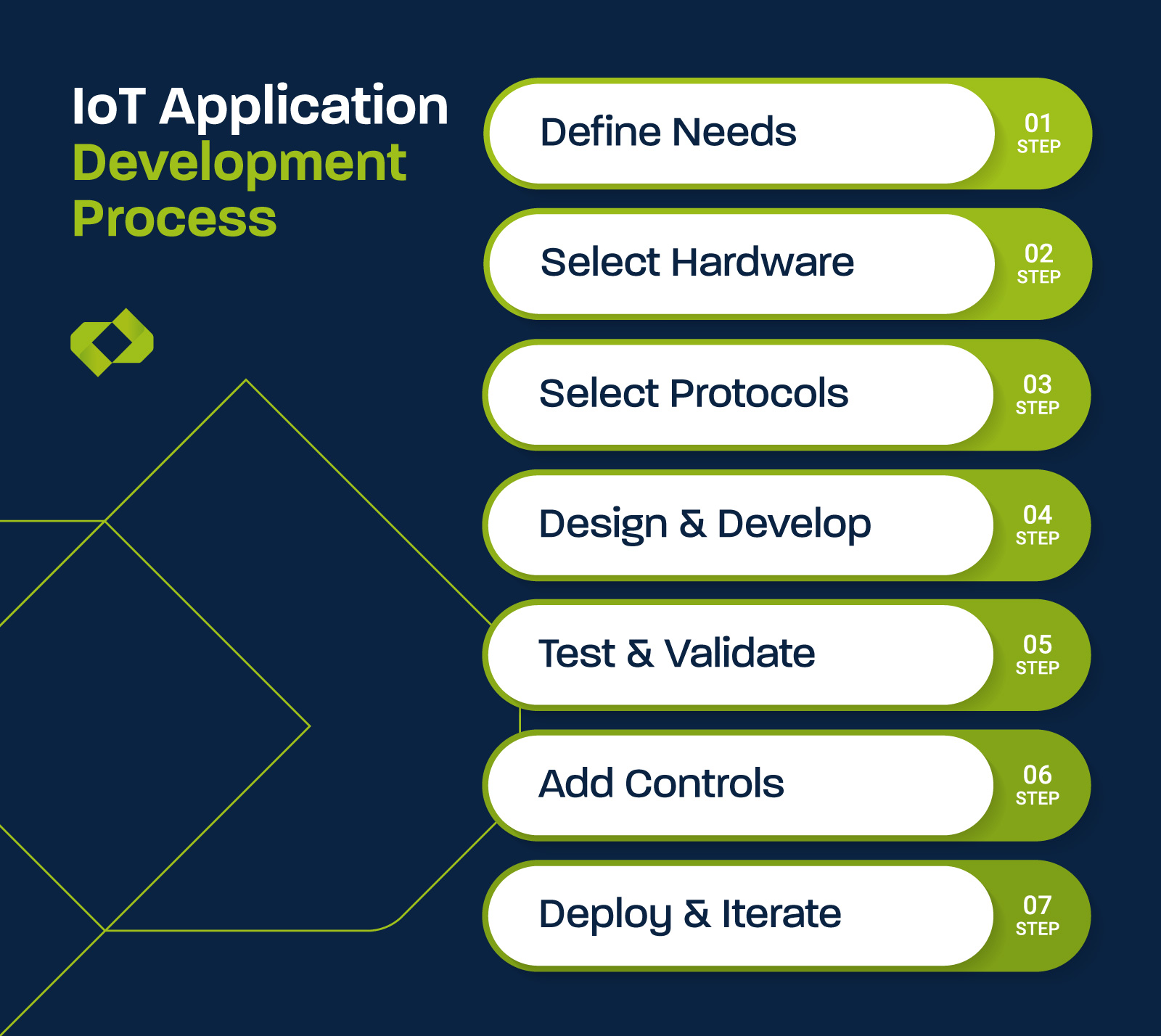
Building an IoT app is more involved than a standard software project — you're not just writing code, you're connecting the physical and digital worlds. Each step has real dependencies, and decisions made early will constrain your options later. Here's what the process actually looks like in practice.
Step 1: Define Your Use Case and Requirements
Before any code is written or hardware is selected, you need a clear, specific problem statement.
At this stage, you're answering questions like:
- What business outcome are we trying to achieve, and how will we measure it?
- Which devices or assets need to be connected?
- How frequently does data need to be collected — continuously, every few minutes, or in batches?
- Who are the end users, and what do they need to see or do with the data?
- Are there compliance or regulatory requirements (HIPAA, FDA, ISO, etc.) that will constrain your design?
- Do you want the system to predict outcomes as opposed to just reporting them? And if so, does your team have the in-house expertise to build and maintain AI models — or will you need a partner?
Getting this step right is the single biggest factor in whether your project succeeds. Vague requirements lead to scope creep, budget overruns, and, ultimately, a tool nobody uses.
Step 2: Choose the Right Hardware
Once your use case is defined, you can select the sensors, processors, and communication modules that will actually collect and transmit your data. This is where a lot of first-time IoT projects run into trouble — hardware choices have long lead times and are difficult to reverse, so getting it wrong is expensive.
Key considerations include:
- What type of data are you collecting?
- What's the operating environment?
- Will devices be hardwired or battery-powered?
- How many devices are you deploying?
It's also worth evaluating whether off-the-shelf development kits can accelerate your timeline. These pre-configured bundles are great for proof-of-concept work, but they may not be the right fit for a full production deployment.
Step 3: Select Your Network and Communication Protocols
Your hardware needs a way to get data to the cloud or a central processing system — and the network you choose will affect reliability, security, cost, and battery life. There's no single right answer here; the best option depends on your specific constraints.
Here are some of the most common options:
Wi-Fi
Wi-Fi works well for indoor environments with stable infrastructure and devices that are plugged in or near power sources. It's familiar and cost-effective, but it consumes more power than other options and may not reach remote or outdoor locations.
Bluetooth/BLE
This option is ideal for short-range communication, especially in healthcare wearables or applications where devices interact directly with smartphones.
Cellular (4G/5G)
Cellular is the go-to for mobile or remote assets — delivery vehicles, field equipment, off-site facilities — where you need reliable coverage without depending on local infrastructure.
LoRaWAN
Short for Long Range Wide Area Network, LoRaWAN is a low-power wireless communication protocol designed to send small amounts of data over long distances. It's worth considering for wide-area deployments like agriculture or smart city applications where devices are spread across large distances and need to operate on minimal power for extended periods.
MQTT
MQTT (Message Queuing Telemetry Transport) is a set of rules that governs how IoT devices package and transmit data to a central system. It's commonly used to move IoT data efficiently, particularly in environments with limited bandwidth or intermittent connectivity where heavier protocols would slow things down or drop data.
Pro tip: Two critical considerations that often get underweighted: latency and security. If your application requires real-time response — like automated safety shutoffs or live patient monitoring — you need a protocol that can reliably deliver data within milliseconds.
Step 4: Design and Develop the Application
With your hardware selected and your connectivity approach defined, development can begin. This phase has three interconnected layers:
The Backend
This is where data is ingested, processed, stored, and made available to other systems. Key decisions here include your cloud platform, your database architecture, and how you'll handle data pipelines at scale.
If ML is part of the plan, this layer also needs to support model training, inference, and ongoing monitoring as models learn and drift over time.
The Frontend/User Interface
Whether it's a web dashboard, mobile app, or embedded control panel, the user interface (UI) needs to be built around how real users will interact with the system.
Overly complex dashboards are one of the most common reasons IoT tools go unused after launch.
Device Firmware and Integration
In many cases, you'll also need to write or configure the software running on the devices themselves — determining how they collect, package, and transmit data.
It's also at this stage that you'll wire up integrations with any existing business systems, like ERP platforms, CMMS tools, EHR systems, or third-party APIs.
Step 5: Connect, Test, and Validate
Once your components are built, integration testing begins. Keep in mind that you're not just testing code; you're testing the interaction between hardware, network, and software under real-world conditions.
A few things to prioritize:
End-to-End Data Flow Testing
Verify that data collected by sensors accurately arrives at your dashboards and triggers the right actions. Latency, data loss, and formatting errors are common at this stage.
Edge Case and Failure Mode Testing
What happens when a device loses connectivity? When a sensor returns an out-of-range value? When the network goes down mid-transmission? Your system needs to handle these scenarios gracefully.
Load Testing
If you're deploying at scale, simulate your full device volume before launch. Systems that perform perfectly at 10 devices can behave unpredictably at 500.
Hardware Validation in the Actual Environment
Lab testing and real-world performance can diverge significantly! Whenever possible, run a field test in the target environment before full deployment.
Step 6: Implement Security and Compliance Controls
To be clear, security in IoT is not just a feature you add at the end. It needs to be designed in from the start. But this step is where you formalize and validate your security posture before launch.
At a minimum, this includes:
Encryption
All data in transit and at rest should be encrypted. This is non-negotiable, especially in regulated industries like healthcare or finance.
Device Authentication
Each device should have a unique identity that's verified before it's allowed to communicate with your systems. Shared credentials across devices are a significant vulnerability.
Access Controls
Role-based access should govern who can view, configure, or control each part of the system — from field technicians to executives to third-party vendors.
Regulatory Compliance
Depending on your industry, you may need to satisfy HIPAA, SOC 2, FDA 21 CFR Part 11, or other frameworks. These requirements should inform your architecture from day one, not be retrofitted in at the end.
Step 7: Deploy, Monitor, and Iterate
Launch is not the finish line. IoT applications require ongoing monitoring to stay healthy as devices age, usage scales, and business needs evolve.
Post-launch priorities include:
System Health Monitoring
Track device connectivity, data pipeline performance, and error rates. Alerts should fire before users notice a problem, not after.
Firmware and Software Updates
Devices in the field need to receive updates securely and reliably, often without being taken offline. This requires a robust over-the-air (OTA) update strategy.
Performance Benchmarking Against Business Outcomes
Go back to the goals you defined in Step 1. Is the system delivering the ROI you projected? Are users actually using it? These conversations should happen at regular intervals.
Scaling Infrastructure Proactively
As your device count grows, your backend needs to grow with it.
Pro tip: Architecting for scalability upfront is far cheaper than re-platforming under pressure.
What Can Go Wrong When Building IoT Apps?

An IoT app can be a game-changer, but that’s only when everything goes right.
Unfortunately, 75% of IoT projects fail.
Why IoT Apps Often Require External Help
Building an IoT application isn't just another software project! Here’s why many companies shouldn’t attempt to create an app entirely by themselves:
- IoT development demands expertise that most organizations don't have
- Internal teams tend to struggle with integration and app scalability
- Most internal cybersecurity teams are focused on traditional IT infrastructure, not embedded devices
- IoT projects require a lot of coordination, and often stall because of misalignment and competing priorities
- It’s tempting for internal teams to think of an IoT tool as a one-off initiative instead of seeing the bigger picture
- Building and maintaining in-house AI and machine learning capabilities is a separate discipline from IoT development — and most organizations don't have both
Pro tip: Whenever ML is added, the project becomes more complex. Training models on operational data, monitoring for drift, and maintaining the integration between ML outputs and your IoT hardware requires a skill set that goes beyond standard application development. Most internal teams are learning this as they go — which is exactly where projects stall or get abandoned.
Pro Tips To Increase IoT App Development Success
There’s always a learning curve when creating an IoT tool for the first time.
However, if your in-house team has all the skills required to build an IoT app in-house, here are a few things I’d recommend to increase your odds of success:
- Start with a small proof of concept before scaling it up
- Ensure strong cloud integration, so your data can flow securely into dashboards and reports
- Incorporate quality assurance automation early to guarantee reliability
- Provide robust documentation, manuals, and end-user training to reduce friction and mistakes
How Much Does an IoT App Cost?
Simple applications can range from $40,000 to $80,000, while medium complexity projects cost between $60,000 and $150,000. Advanced applications with multiple integrations and sophisticated features can exceed $300,000.
Your final cost depends on several key factors:
- The number and types of devices you need to connect
- Security requirements and authentication features
- Third-party integrations and APIs
- The user interface
- Testing requirements across different devices and environments
- Any custom hardware or specialized cloud infrastructure required
Keep in mind that these are only development costs! You'll also need to budget for ongoing expenses like cloud hosting, device connectivity, maintenance, and future updates as your system scales.
When Should You Work With an IoT App Development Company?
I’d definitely recommend fully outsourcing IoT app development if your team doesn’t have the skills needed in-house or if you have special compliance requirements. You could also bring in a skilled partner for certain phases of your project, like when you’re scaling beyond a pilot into your full production environment.
Just be sure that your partner has proven experience in your industry and a track record of delivering secure, scalable IoT solutions.
At Capmation, we bring deep expertise in IoT development across agriculture, manufacturing, logistics, retail, healthcare, and hospitality sectors. Plus, having a nearshore team means we can help our clients save money without sacrificing speed or quality.
Interested in learning more about how we approach IoT projects? Click the link below to see how we helped a manufacturing client maximize uptime.

Topics: Reviewing Code | Software Development | Machine Learning and AI | IoT